Kivorla
9-Spectrum Red Light Panel
9-Spectrum Red Light Panel
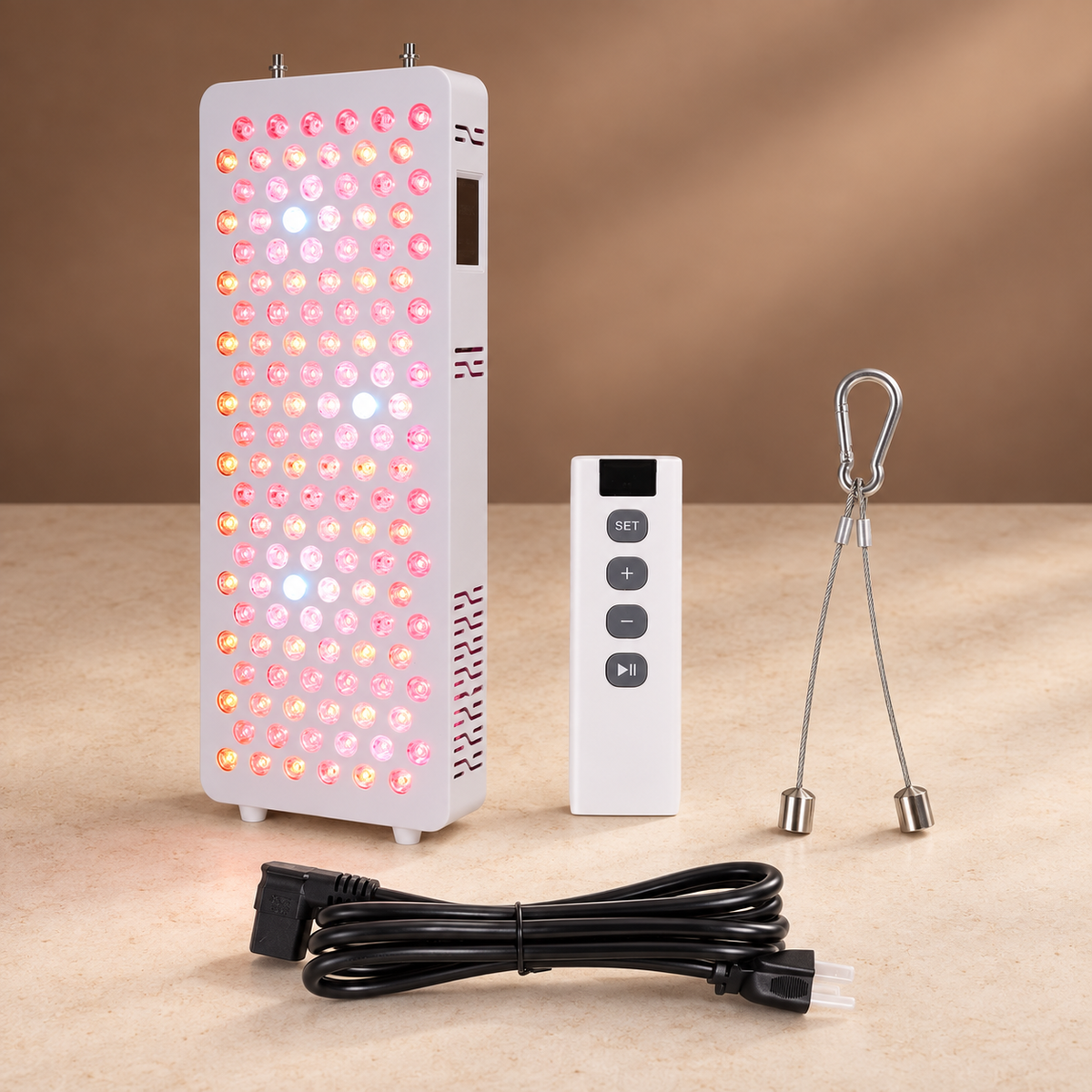
A 240W half-body panel with nine wavelengths from 480nm to 1060nm, each one dimmable and pulsable on its own. Build a session once on the touchscreen, then recall it from the screen, the remote or your phone.
Couldn't load pickup availability
Product Description
A half-body panel built for people who want control over the light rather than a single fixed red. 144 dual-chip LEDs cover nine wavelengths — 480, 590, 630, 660, 670, 810, 830, 850 and 1060nm — and every one of them can be dimmed independently from 1–100% and pulsed anywhere from 1Hz to 10,000Hz.
Build a protocol once, then recall it from the touchscreen, the 2.4G remote or the phone app over Bluetooth. Multiple panels can be grouped, with one panel set as primary and the rest following it.
At 6 inches the panel delivers over 1567 W/m² across the full spectrum, with red at 150 W/m² and near-infrared above 1200 W/m². It ships with a pulley and door hook, so it can hang over a door, stand on its base beside a bed, or be raised and lowered to whatever height you are treating.
How to Use
- Hang the panel from the door hook and pulley, or stand it on its base, and set the height you want to treat.
- Plug in the power cord and turn the panel on with the switch on the back.
- Put on the supplied goggles before starting a session.
- On the touchscreen, set the Timer — drag the bar or tap the centre of the circle to type an exact number, from 1 to 30 minutes.
- Open Mode and choose which wavelengths run — all of them, or any single wavelength on its own.
- Open Brightness to dim each wavelength from 1–100% independently.
- Optionally open Pulse and set a frequency from 1 to 10,000Hz for each wavelength.
- Press Start and stand or lie at your chosen distance. The panel switches off on its own when the timer ends.
Good to know
- If no time is set, the panel runs a default 15-minute session and then shuts off.
- Settings are saved, so a protocol you build once can be recalled next time.
- The alarm clock, date and time, screen brightness and prompt volume are all set from the same menu.
- To run more than one panel together, set one to Primary and the others to Secondary in the Group menu.
- Near-infrared light above 800nm is invisible to the eye — the panel can be running correctly even when those LEDs look dark.
Tech Specifications
- LEDs: 144 dual-chip
- Spectrum: 480, 590, 630, 660, 670, 810, 830, 850 and 1060nm
- Irradiance at 6 in: Full spectrum ≥ 1567 W/m²; red ≥ 150 W/m²; near-infrared ≥ 1200 W/m²
- Dimming: 1–100%, adjustable per wavelength
- Pulsing: 1–10,000Hz, adjustable per wavelength
- Timer: 1–30 minutes, 15 minutes by default
- Control: Touchscreen, 2.4G remote, Bluetooth and app
- Lens options: 30°, 60° or 90°
- Power: 240W actual; 100–240V AC, 50/60Hz
- Working current: 3.3A at 110V, 1.64A at 220V
- Dimensions: 640 × 230 × 65 mm
- Weight: 6.3 kg gross
- Housing: Iron, white
In the Box
- Light panel
- Power cord with plug
- Controller
- Protective goggles
- Pulley and door hook
- User manual
Safety & Suitability
This is a general wellness device, not a medical one. Read the included manual before first use.
Do not use if you
- Are pregnant
- Have epilepsy
- Have a thyroid condition or take thyroid medication
- Take photosensitising medication
- Have broken skin, an open wound or a skin injury on the treatment area
If you have a medical condition, or are unsure whether the device is suitable for you, speak to a qualified healthcare professional before use.
General precautions
- Always wear the supplied goggles. Do not look directly into the panel.
- Keep the panel away from water and heat sources.
- Make sure the door hook and pulley are secure before hanging the panel.
- Do not use the panel if the housing or cord is damaged.
- Keep out of reach of children.
- Do not attempt to repair the panel yourself — contact us instead.
Share